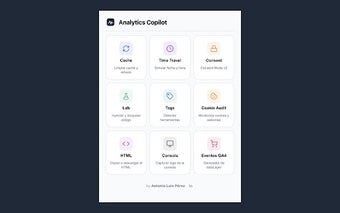
Analytics Copilot: Chrome extension for technical analytics QA
Analytics Copilot, developed by an independent developer, alpc-data-analyst, is a Chrome extension for technical QA of web analytics implementations. It embeds auditing utilities into the browser to inspect GA4, Google Tag Manager, and Google Ads setups during testing and debugging. The extension groups nine specialized tools for consent decoding, tag scanning, session auditing, and environment simulation. Intended for implementers and auditors, it supports in-browser verification tailored to hands-on tracking and compliance checks.
What the tool inspects and how it supports verification
Analytics Copilot bundles a set of targeted utilities that audit tracking implementations rather than offering general reporting. Key capabilities include a Consent Mode v2 Inspector that decodes GCS/GCD strings and applies 18 built-in rules, a Tag Scanner that detects over 40 tracking tools, and a GA4 Event Generator which produces dataLayer.push() snippets for ecommerce and recommended events. These functions map to concrete QA tasks used by implementers.
How it fits into a DevTools debugging workflow
The extension integrates directly into Chrome DevTools with a persistent Analytics Copilot tab while also exposing a quick-access popup. That dual interface lets users switch between a fast checklist and a deeper debugging pane. The Environment Lab permits injecting test GTM containers and blocking network requests by pattern, so tests and blocking rules can be applied immediately within the browser session without external tooling.
How it verifies sessions, cookies and advertising attribution
For session-level verification the tool tracks GA4 client_id values and shows inactivity countdowns in real time, which helps confirm session continuity. For advertising flows it follows gclid to _gcl_aw conversion linker signals and offers enhanced-conversion checks to validate Google Ads attribution paths. Those checks provide targeted evidence for common data-collection and attribution issues auditors encounter.
How simulation and timing tests are handled
Analytics Copilot includes a Time Travel capability that overrides the browser clock to test time-sensitive triggers and scheduled rules. Combined with the Environment Lab’s network blocking and test container injection, users can replicate delayed events, scheduled promotions, and other temporal scenarios inside a single browser profile. The extension is published as a Manifest V3 Chrome add-on and requires DevTools access for full feature exposure.
A focused QA tool for technical implementers with niche adoption
Analytics Copilot is a practical option for technical implementers who need in-browser, evidence-based audits; its specialist focus suits GTM and GA4 developers rather than casual marketers. The extension operates with zero telemetry and keeps all audit data local, and the project shows active maintenance despite a small user base on the Chrome Web Store. Tip: run it in a dedicated test profile to keep experiments isolated from daily browsing.